
HTTP & SOCKS5 Proxy Setup
HTTP and SOCKS5 are the quickest way to use your XProxy modems: every browser, anti-detect profile, bot and scraper has a proxy field for them. This guide shows where to find your proxies, how to protect them, and how to copy them in exactly the format your tool expects.
At a glance
| What | Value for modem #1 |
|---|---|
| HTTP port | 4001 |
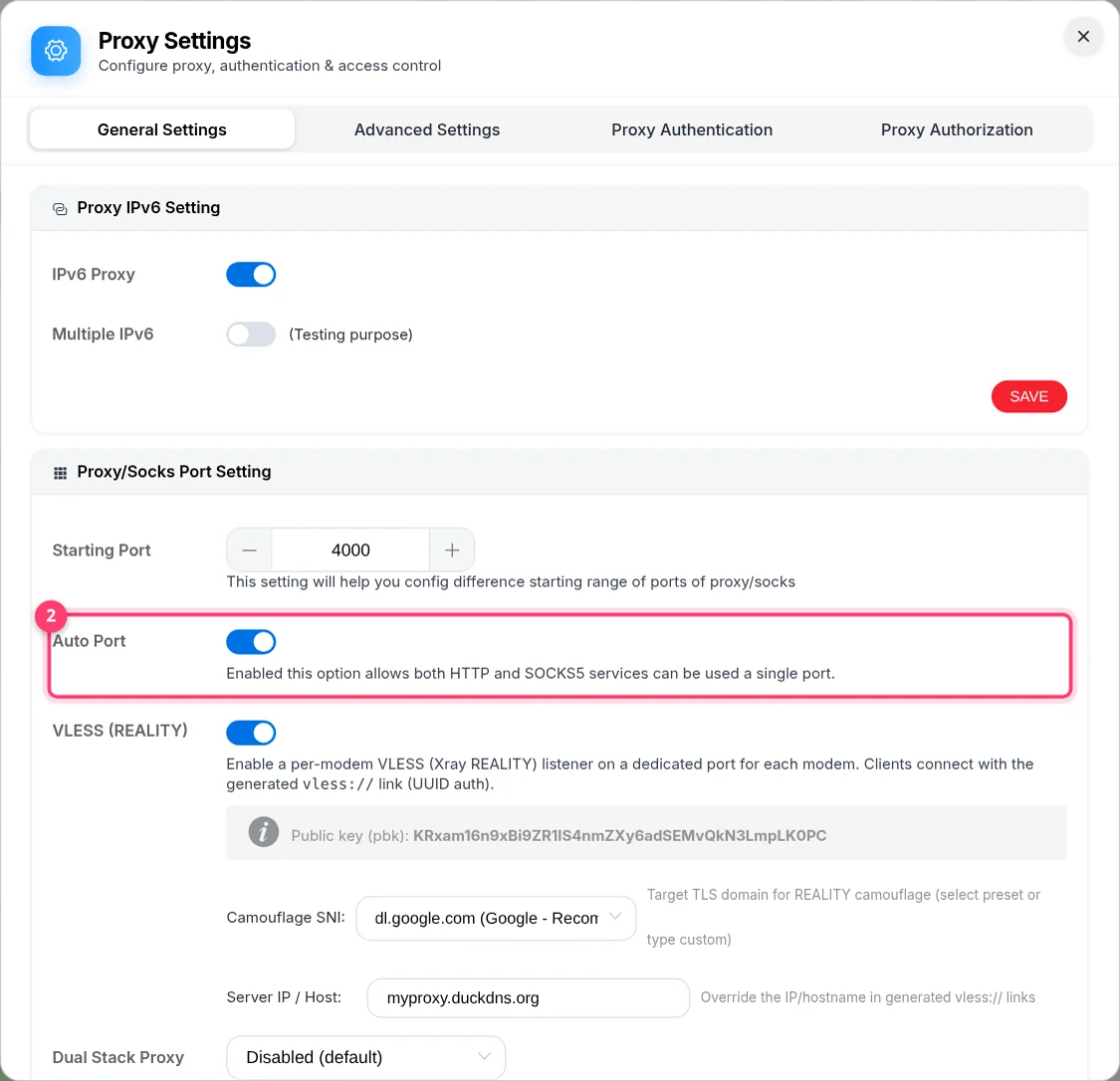
| SOCKS5 port | 4001 when Auto Port is on (one port serves both) · 5001 when it is off |
| IPv6 port (SIM with IPv6 only) | 6001 (SOCKS5 7001 when Auto Port is off) |
| Login | Username + password, IP whitelist, or both |
| Typical format | 192.168.1.10:4001:demo:proxy123 or socks5://demo:[email protected]:4001 |
Step 1 — Find your proxies
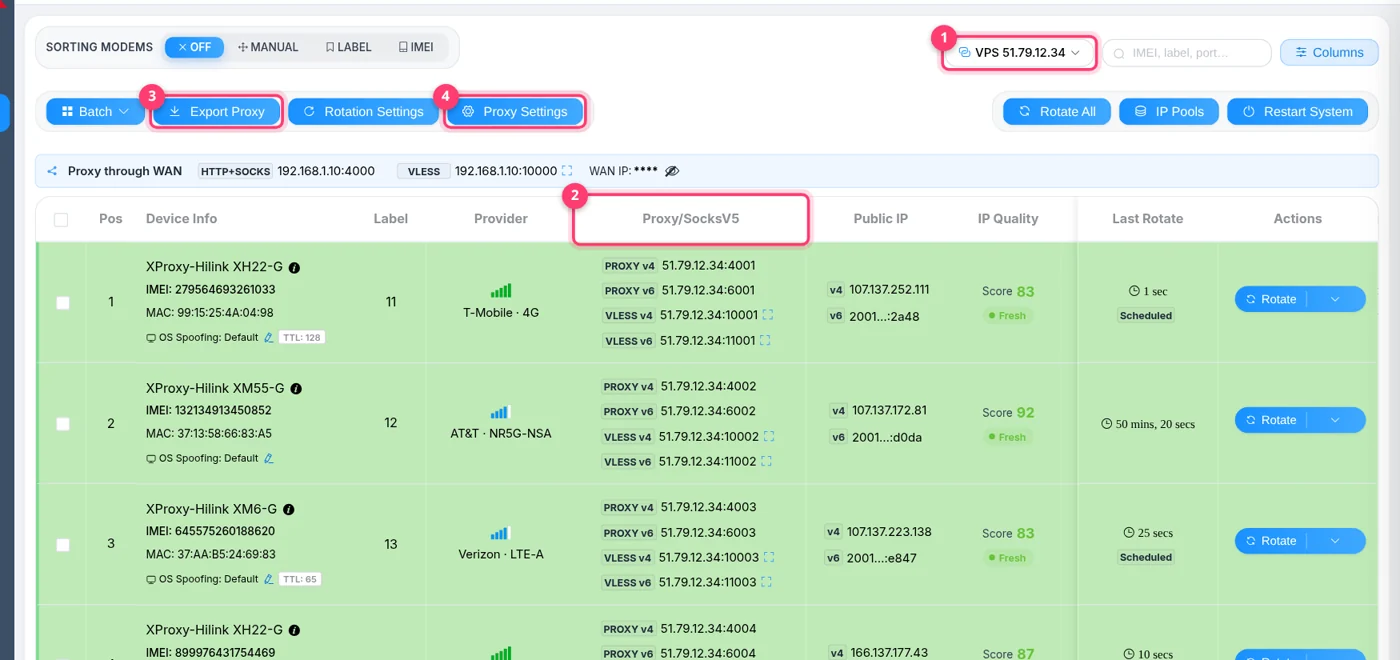
Open Proxy Management. The Proxy/SocksV5 column lists the ports of every modem:
- PROXY v4 — one port for both HTTP and SOCKS5 (Auto Port on).
- HTTP v4 and SOCKS v4 — separate ports (Auto Port off).
- PROXY v6 / HTTP v6 / SOCKS v6 — IPv6 exits, only shown when the SIM gets an IPv6 address.
Step 2 — Choose how people connect
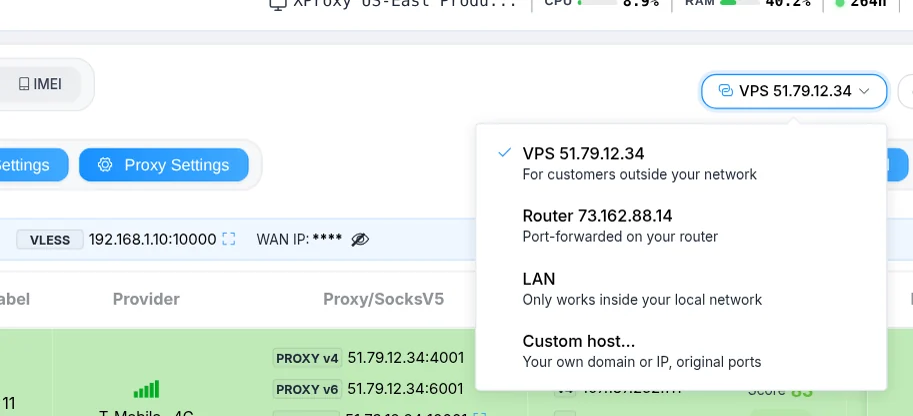
The Connect via button above the table decides which address is shown and copied for every proxy:
| Option | Use it when |
|---|---|
| VPS | Customers are outside your network and you use VPS Forwarding. The VPS IP becomes the host. Works behind CGNAT. The port may differ from the local one if you set a port offset in Forwarding Ports — always copy the port shown in the table. |
| Router | You forwarded the ports on your router (NAT Forwarding). Your public IP is used as host. |
| LAN | The tool runs on the same network as the box. Free and fastest, but does not work from outside. |
| Custom host… | You have your own domain or DDNS name pointing to the box. |
Step 3 — Protect your proxies
Open Proxy Settings → Proxy Authentication. You can use either method, or both:
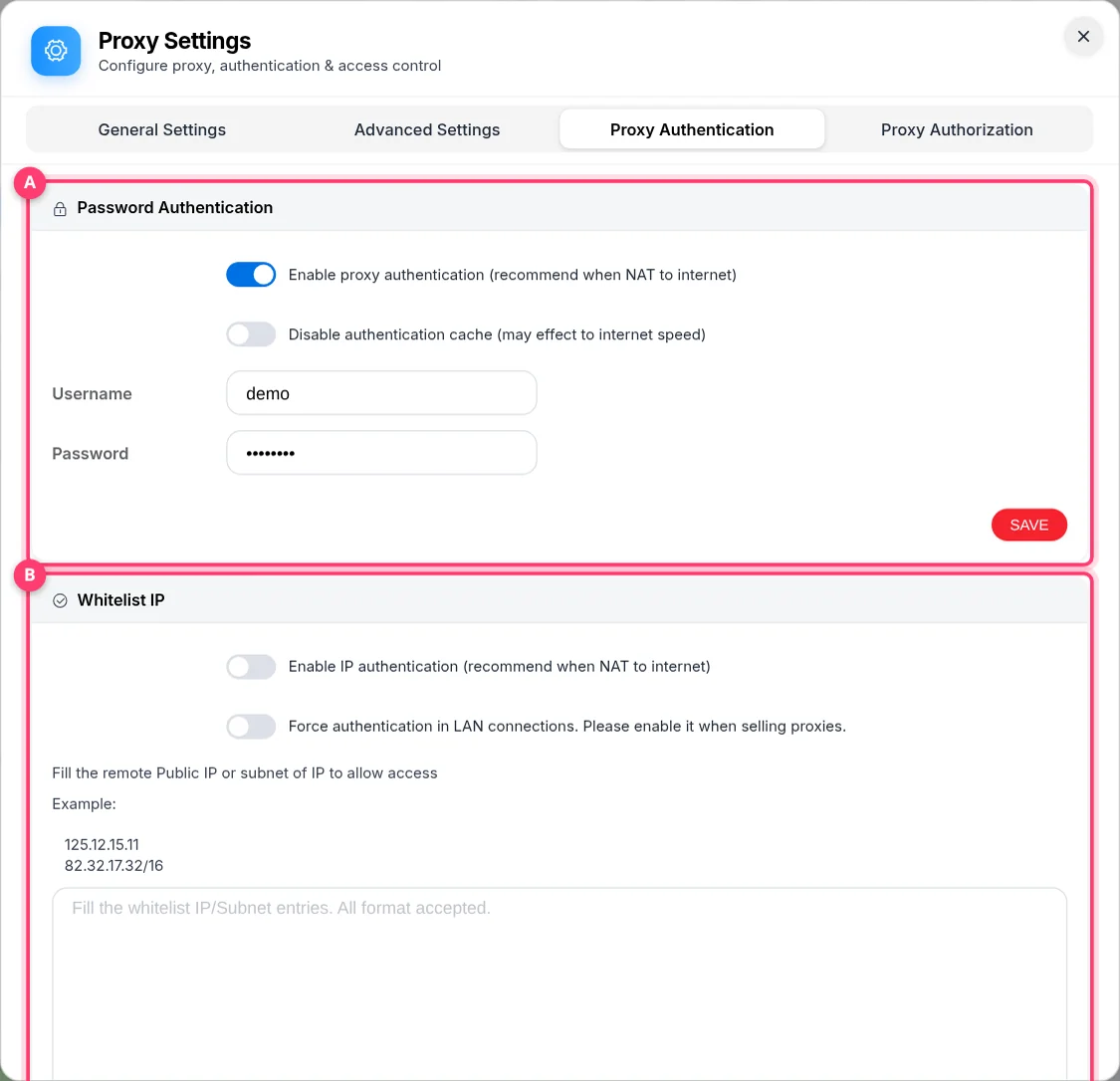
- Password Authentication — turn on Enable proxy authentication, set a Username and Password, save. The same login works on every port. Best when the people using the proxy change networks often.
- Whitelist IP (Basic plan or higher) — turn on Enable IP authentication and list the public IPs or subnets that may connect, e.g.
125.12.15.11or82.32.17.0/24. No password is needed in the tool. Turn on Force authentication in LAN connections if devices on your own network must log in too (recommended when you sell proxies).
Step 4 — Copy or export in the right format
Click any proxy in the table to copy it. It is copied in the format chosen under Export Proxy, so set that once:
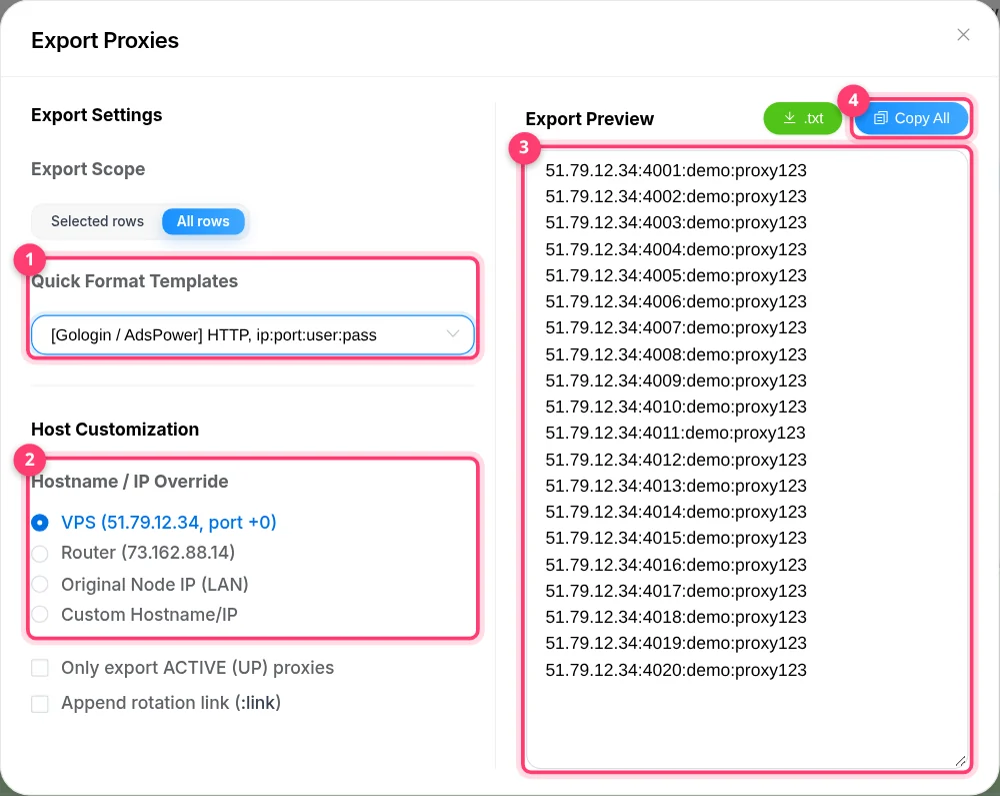
| Template | Example line | Paste into |
|---|---|---|
| [Gologin / AdsPower] HTTP, ip:port:user:pass | 51.79.12.34:4001:demo:proxy123 | GoLogin, AdsPower, Dolphin{anty}, most anti-detect browsers |
| [Multilogin / VMLogin] SOCKS5, ip:port:user:pass | 51.79.12.34:4001:demo:proxy123 | Multilogin, VMLogin (select SOCKS5) |
| [Shadowrocket / Surge] SOCKS5, socks5://user:pass@ip:port | socks5://demo:[email protected]:4001 | Shadowrocket, Surge, code and CLI tools |
| [Proxifier / ProxyCap] SOCKS5, ip:port (No Auth) | 51.79.12.34:4001 | Proxifier, ProxyCap — with IP whitelist |
| [Standard] HTTP / SOCKS5, user:pass@ip:port or ip:port@user:pass | demo:[email protected]:4001 | Scrapers, bots, any tool asking for a URL |
Useful extras in the same dialog: Only export ACTIVE (UP) proxies, Include protocol prefix (adds http:// or socks5://) and Append rotation link (adds the change-IP URL to the end of each line).
Use the proxy in your tool
# HTTP
curl -x http://demo:[email protected]:4001 https://api.ipify.org

# SOCKS5 — "socks5h" lets the proxy resolve DNS (no DNS leak)
curl -x socks5h://demo:[email protected]:4001 https://api.ipify.org
Both commands should print the mobile IP of modem #1, not your own IP. With Auto Port off, SOCKS5 is on port 5001.
Using an anti-detect browser? Follow the dedicated guide: AdsPower, GoLogin, Multilogin, Dolphin{anty}.
Change the IP
Each proxy has its own rotation link. Click LINK in the Rotation column (or Copy Rotation Link in the row menu). Calling it makes that modem reconnect and get a new mobile IP:
curl "http://192.168.1.10/reset?proxy=p:4001"Timers, API calls and auto-rotation are explained in How to Change / Rotate IP.
Different logins per port (Business plan)
Selling or sharing proxies? Give every customer their own login. Go to General Settings → Proxy Setting → Authentication, switch on Enable Port Auth and write one rule per line:
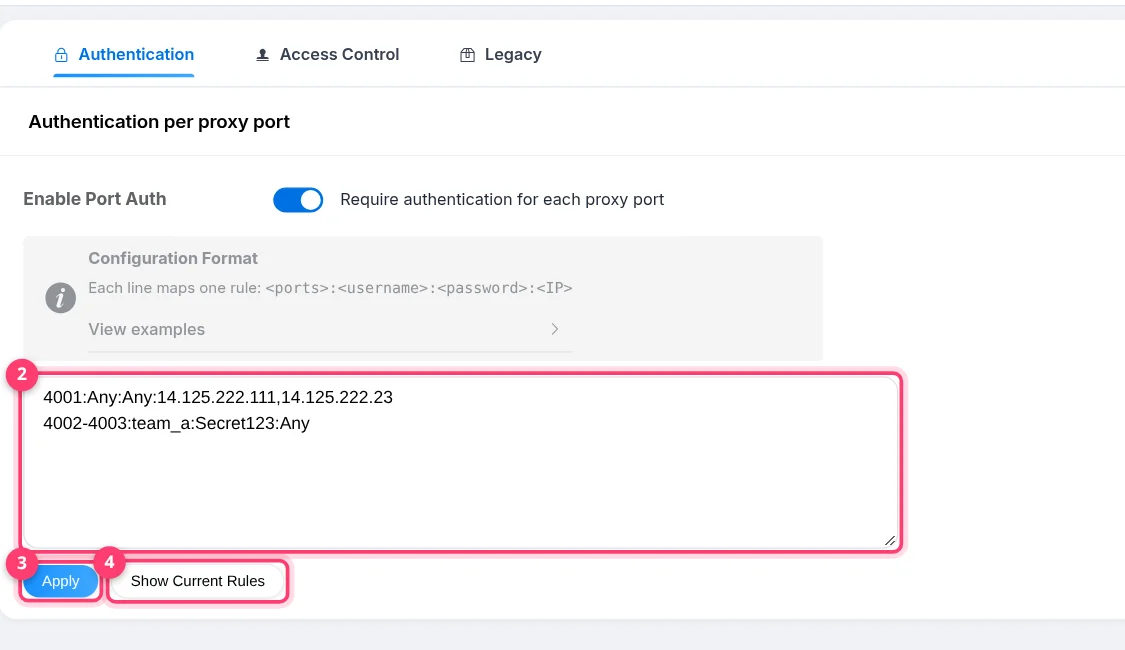
# only these IPs may use port 4001 (no password)
4001:Any:Any:14.125.222.111,14.125.222.23

# ports 4002 to 4005 share one login, from any IP
4002-4005:team_a:Secret123:Any- Use
Anyto skip a field. Usernames and passwords may contain letters, digits and_. - Show Current Rules lists every port with its token. A customer can rotate their own port with
http://<host>/<token>/reset?proxy=p:<port>— they never need your dashboard password.
HTTP or SOCKS5?
| HTTP | SOCKS5 | |
|---|---|---|
| Supported by | Almost every tool | Most tools, all anti-detect browsers |
| Traffic | Web traffic (HTTP/HTTPS) | Any TCP connection (mail, games, custom apps) |
| DNS | Resolved by the proxy | Resolved by the proxy when you use socks5h:// (recommended) |
| UDP (WebRTC, QUIC, games) | No | Through VPS Forwarding with UDP Socks5 enabled — or use VLESS / WireGuard |
Troubleshooting
| Symptom | Fix |
|---|---|
407 Proxy Authentication Required — or, on HTTPS sites, the connection just closes | Username or password is wrong or missing. SOCKS5 tools show it as an authentication error. Copy the proxy again after saving Proxy Authentication. |
| Works at home, times out from outside | You copied the LAN address. Switch Connect via to VPS, Router or Custom host, and make sure those ports are forwarded. |
| Connection refused on port 5001 | Auto Port is on, so SOCKS5 lives on 4001. Use the port shown in the table. |
| Whitelisted, but access is denied | Your public IP changed. Check it at api.ipify.org and update the whitelist. |
| Website still sees your own IP or location | The app is not using the proxy for everything (WebRTC, DNS). Use socks5h://, an anti-detect browser, or switch to VPN mode. |
FAQ
Can HTTP and SOCKS5 really share one port?
Yes. With Auto Port on, XProxy detects the protocol of each connection, so 4001 answers both. Tools that ask you to pick a type work with either choice.
Can several people use the same port at once?
Yes, but they share the same modem and the same IP — and a rotation changes the IP for all of them. Give each customer their own port when they need their own IP.
When do I get IPv6 proxies?
When the SIM card and carrier give the modem an IPv6 address and IPv6 Proxy is enabled in Proxy Settings (Basic plan or higher). Otherwise only IPv4 ports are shown.
